
The unescaper now tells you if the result is JSON
Recovering an embedded document from an escaped string? The unescaper now checks the result and says whether it parses.
The typical unescape session is a recovery mission: someone embedded a JSON document inside a JSON string (a webhook body in a log line, a config in a database field), and you need the inner document back. The unescape step was never the hard part — knowing whether the recovered text is actually valid JSON was the follow-up you always had to do by hand.
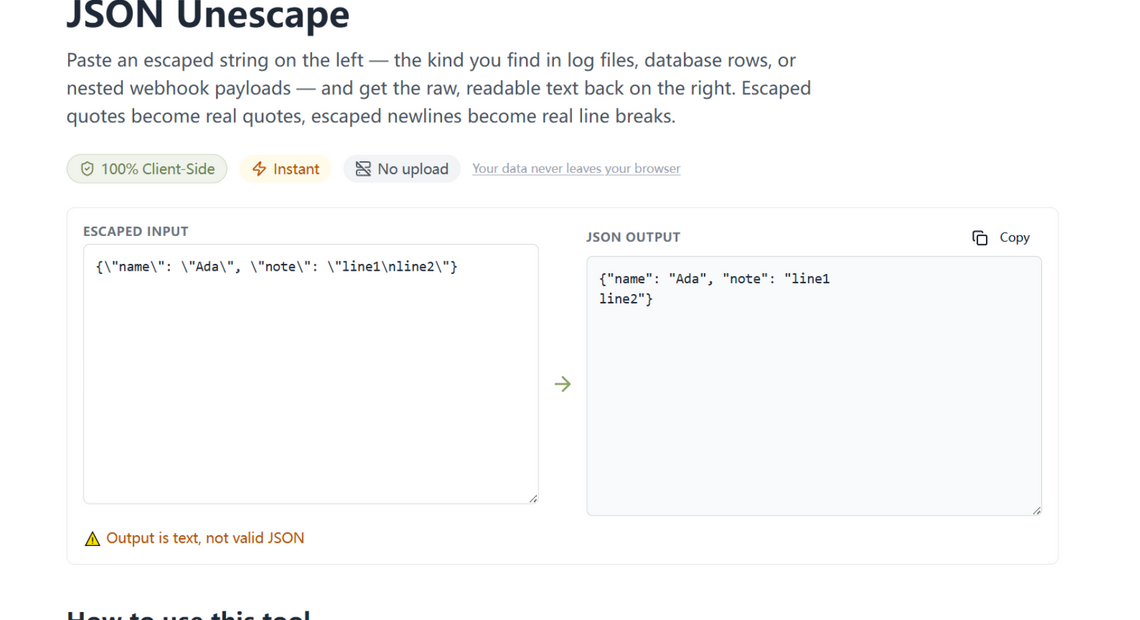
What changed
After every unescape, the output is checked against a real JSON parser and a status line appears:
- ✓ Output is valid JSON — paste it straight into the editor or the tree view; the document is sound.
- ⚠ Output is text, not valid JSON — common and harmless when the escaped content was a plain string (a sentence, a snippet), but exactly what you want to know when you expected a document.
The same check runs on the Base64 decoder, where the recovered payload is even more often expected to be JSON.
How to use it
Paste the escaped string into the unescaper and read the badge. If it is green, copy the result into the editor and keep working; if it is amber, you have recovered text, not a document — and now you know that before the next step, not after.
Every output is checked
Validation after transformation is the kind of feature users never ask for by name and immediately rely on. Our rule is simple: every tool on this site that produces JSON spends one JSON.parse to tell you whether it produced JSON. It costs milliseconds and removes the paste-and-pray step from every recovery mission.
Try it in your browser
Every tool on JSON Formatter App runs 100% client-side. No upload, no signup.
Open the editor