
NDJSON logs: line counts and exact error lines
Two quiet upgrades to the NDJSON viewer: a record count you can trust, and parse errors that name their line.
NDJSON (newline-delimited JSON) is the format of logs and event streams — which means two questions dominate every session: how many records did I get? and which line is broken? The viewer now answers both directly.
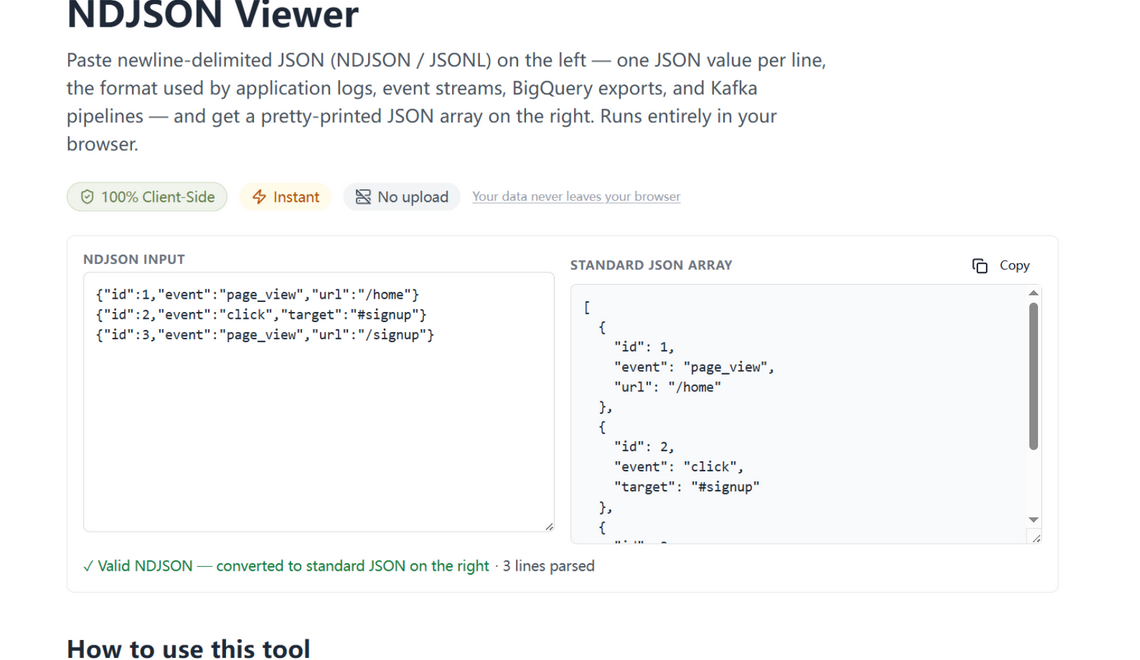
What changed
- Record count — the green confirmation now includes the number of records parsed (“✓ Valid NDJSON · 3 lines parsed”), so you immediately know whether your export, tail, or filter captured what you expected.
- Line-pinned errors — a malformed line fails with “Invalid NDJSON on line 41,203: …” instead of a bare parse error, and blank lines are tolerated rather than treated as corruption (many log shippers emit a trailing newline).
How to use it
Paste your stream into the NDJSON viewer. Valid input converts to a standard JSON array on the right (ready for jq, CSV export, or the tree view); invalid input tells you the first line that broke, not just that something did. As with every tool here, your logs never leave the browser — which matters, because logs are the most sensitive payloads people paste anywhere.
Built for the format, not adapted to it
Most “NDJSON viewers” are JSON formatters that happen to tolerate the format. This one treats NDJSON as what it is — a stream of records — so the first things it tells you are the two things a stream is for: how many records, and which one broke. Small features, but they are the difference between a viewer and a debugger.
Try it in your browser
Every tool on JSON Formatter App runs 100% client-side. No upload, no signup.
Open the editor