
Formatting & validation, rebuilt: indent control, one-click minify, and errors you can actually fix
The two features people actually use all day — formatting and validation — just got a ground-up upgrade, informed by a decade of lessons from the tools that came before us.
Every JSON tool lives or dies on two features: formatting (beautify the blob you just pasted) and validation (tell me what's wrong with it, precisely). Analytics across this category are remarkably consistent — the vast majority of sessions touch little else. So we rebuilt both from the ground up, tested every path in a real browser, and shipped the result today on the home-page editor. This is part one of a two-part rebuild — the follow-up covers the Transform panel, now powered by real jq.
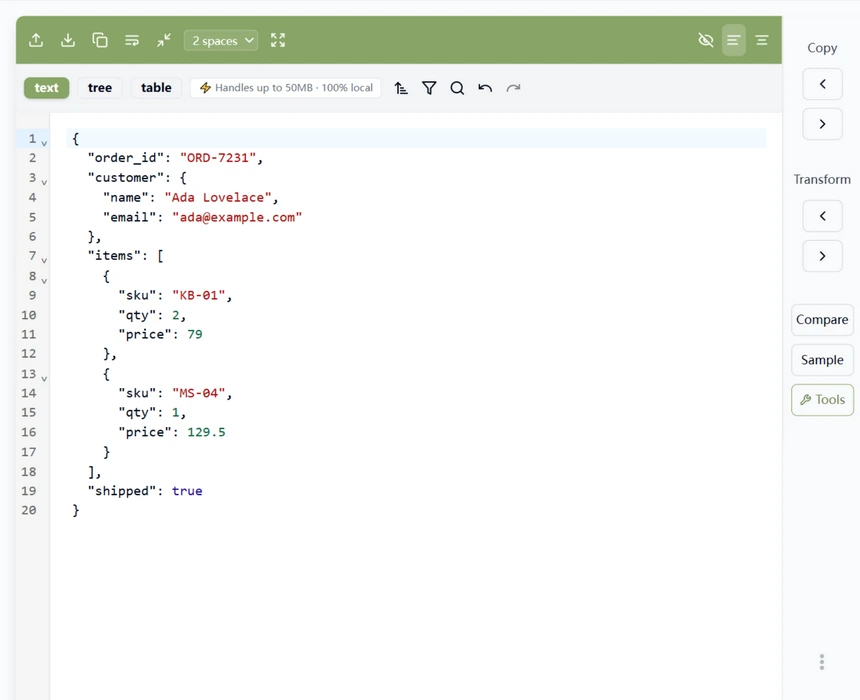
Formatting: your layout, your call
Three additions to the format flow:
- Indent selector — choose 2 spaces, 4 spaces, or hard tabs from a dropdown next to the format button. Your pick is remembered across visits, and it applies to both editor panes.
- One-click minify — the new compress button collapses the document onto a single line, ready for a header or a CI script. Format and minify are one click apart now, not a separate tool page away.
- Undo-safe rewrites — this one fixes a bug we found while testing. Previously, formatting was not recorded in undo history, so one accidental click could scramble your layout with no way back. Every rewrite now — format, minify, sort keys, repair — is a single Ctrl+Z away from being undone.
The keyboard shortcut Ctrl+Shift+F (Cmd+Shift+F on Mac) still formats, and results now land in the editor instantly — we removed a synchronization delay inherited from the editor framework that could leave the view stale for a second or two after formatting.
Validation: errors that name the problem
The old error experience was a raw V8 message — Unexpected token ']', ... is not valid JSON — with no position, because modern Chrome (114+) stopped including at position N in JSON.parse errors entirely. Most tools in this category still parse that message string; on a current browser it simply doesn't exist anymore, so line/column reporting quietly broke. We replaced the whole approach with our own single-pass scanner.
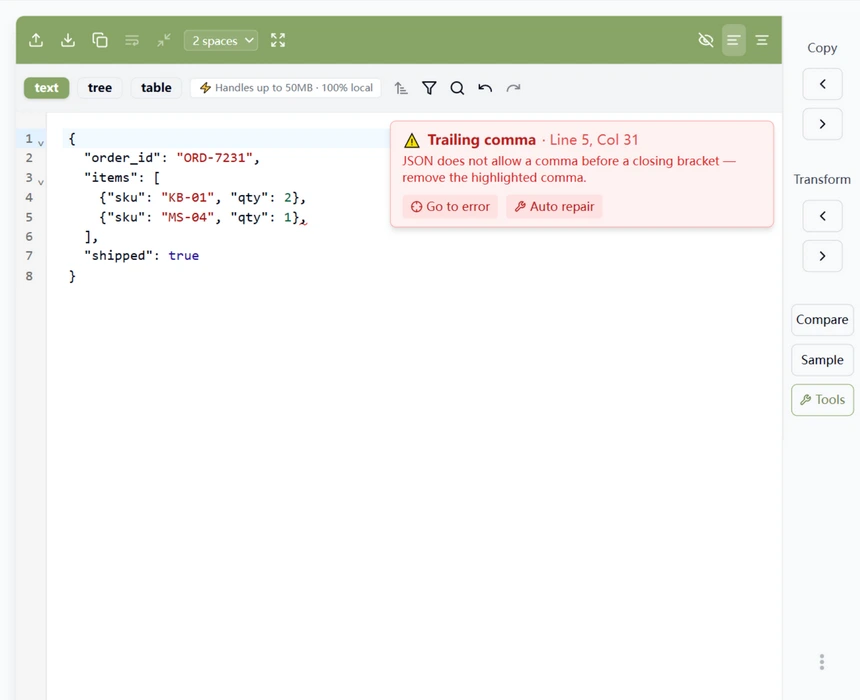
What you get now when the JSON is broken:
- A named error with an exact location — “Trailing comma · Line 5, Col 31”, plus a one-sentence hint on how to fix it. The scanner classifies the eleven mistakes that make up nearly all broken JSON: trailing commas, single quotes, unquoted keys, comments, NaN/Infinity, missing commas or colons, unclosed strings and brackets, and more.
- An inline red squiggle under the exact characters at fault — the same treatment you'd get in VS Code, not a message box floating over the corner.
- Go to error — one click (on the banner button, or on the error text in the status bar) puts the cursor on the offending character and scrolls it into view.
- Auto repair — the banner offers a one-click fix for the repairable classes: trailing commas, single quotes, unquoted keys, comments, and NaN/Infinity. Repairing rewrites the document as strict JSON — and, like every other rewrite, it's undoable.
- A live cursor readout — the status bar now shows the real line/column of your caret instead of a hardcoded placeholder.
How to use it
Format: paste JSON anywhere in the left pane. Pick your indentation from the dropdown (2 spaces / 4 spaces / Tab), then hit the format button or press Ctrl+Shift+F. Need it compact again? The minify button is directly to the right of format. Changed your mind about any of it? Undo walks the whole chain back, step by step.
Validate: there is no validate button — you are always validating. The moment your document breaks, the red banner names the mistake, and the squiggle marks it in the text. Click Go to error to jump there, or Auto repair when the mistake is one of the machine-fixable kinds. Paste with confidence: as with everything on this site, both features run entirely in your browser — the scanner, the repair pass, and the formatter never send a byte anywhere.
What sets this editor apart
Two design commitments shape everything above. First: errors are for humans. This editor computes error positions with its own scanner instead of reading them out of engine message text — a string Chrome quietly stopped including in 2023, which is why position info silently vanished from so many tools. Ours cannot vanish, because it was never borrowed. Second: nothing destructive goes unrecorded. “Format the document and lose your undo history” is a paper cut many tools still ship; we treated it as a bug, because that's what it is — every rewrite here is one Ctrl+Z away.
The result is the feature set you actually use all day — indent control, minify, precise and friendly errors, jump-to-error, auto-repair — in one editor that is private by architecture rather than by promise. One coherent, client-side tool: the features you use all day, the correctness you can verify, and nothing that leaves your machine.
Try it in your browser
Every tool on JSON Formatter App runs 100% client-side. No upload, no signup.
Open the editor