
The validator learned exactly where you went wrong
The standalone validator now shares the main editor's error scanner: named mistakes, exact line/column, and a fix hint.
When we rebuilt the main editor's validation, the standalone JSON validator page kept its older error reporting: a raw parser message in monospace, accurate but unhelpful — and, on modern Chrome, missing the position entirely, because V8 stopped including at position N in its parse errors. That asymmetry is gone: the validator page now runs the same scanner.
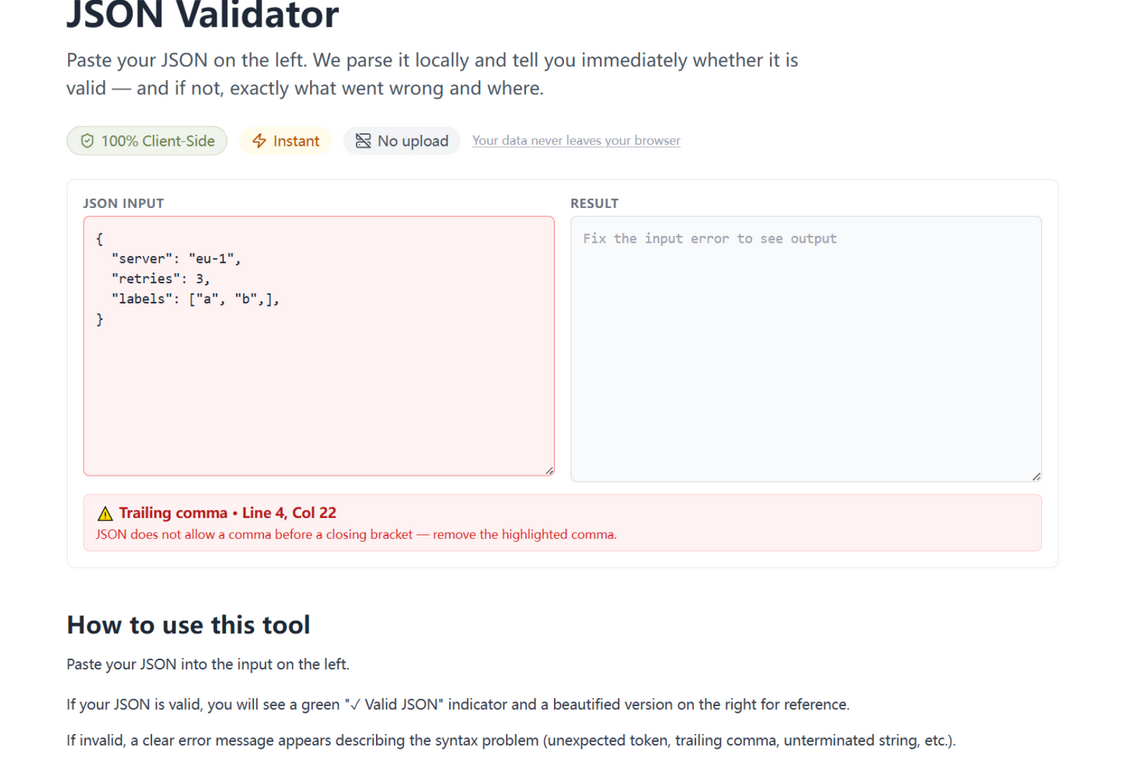
What changed
- Named mistakes — eleven categories cover nearly all broken JSON: trailing commas, single quotes, unquoted keys, comments, NaN/Infinity literals, unclosed strings and brackets, missing commas and colons, and unexpected characters.
- Exact locations — every error carries the precise line and column, computed from our own scan rather than parsed out of an engine message that no longer contains one.
- A fix hint — one sentence on how to repair it, in the same red banner.
How to use it
Paste your JSON on the validator page. Valid documents get the green check as before; broken ones get a banner that reads, for example, “Trailing comma · Line 4, Col 24 — JSON does not allow a comma before a closing bracket.” Fix, paste, re-check — nothing ever leaves the tab.
Built once, shipped everywhere
One engine, every surface. The scanner behind this page — the eleven error categories, the position math — is the same one that powers the main editor's inline squiggles and jump-to-error. Reusable parts compound: the second tool that needs your error engine costs an afternoon, and every improvement lands on both at once.
Try it in your browser
Every tool on JSON Formatter App runs 100% client-side. No upload, no signup.
Open the editor