
Compare, export, explore: smarter JSON diff, Excel-ready CSV, and a searchable tree
Three everyday features, rebuilt: diff that understands arrays, CSV that respects Excel, and a tree you can search — all client-side.
Our rebuild of the editor's core workflows continues. After formatting and validation and the Transform panel, this round tackles the three features that surround the editor: Compare (what changed between two documents?), JSON→CSV (how do I get this into a spreadsheet?), and the tree view (where is that one nested value?). Each had a gap that a decade of competitor tools had already solved — we tested, borrowed the best answer, and in one case found the gap ourselves by simply watching what the feature did to real data.
![The Compare dialog showing 3 changes: users[1].name modified from bob to bobby, users[2] removed with carol, and a clean changes-only summary bar](/images/blog/diff-smart-pairing.png)
Diff: arrays that understand identity
Compare two documents where one array lost an item and gained another. An index-based differ — which is what most free tools ship, including our previous version — reports nonsense: the surviving items get marked “modified” because every later index shifted. In our test case, deleting carol and adding dave produced users[2].id modified and users[2].name modified instead of one removal and one addition.
The Compare dialog now pairs array items by identity: when both arrays are arrays of objects sharing an id, _id or key field, items are matched by that value. Removing carol and adding dave now reads exactly like what happened — one removed, one added, and the genuinely changed field on the survivor. When no reliable identity exists (duplicate ids, missing keys, scalar arrays), it falls back to positional comparison automatically; there is no mode to configure.
Two quiet fixes rode along: the dialog now leads with a changes count instead of a total drowned in “unchanged” entries (the unchanged list is one checkbox away), and large values — that 4 KB blob you accidentally diffed — start collapsed behind a Show more toggle instead of blowing out the card.
CSV: built for what happens after the export
JSON→CSV looked fine right up to the moment you used it. Two failures were guaranteed in the real world: nested values were serialized as raw JSON inside a single cell ("tags": "[\"mech\"]" is not a spreadsheet value), and the output had no UTF-8 BOM, so any non-ASCII text — accented names, CJK product labels — turned into mojibake the moment the file was opened in Excel by double-click.
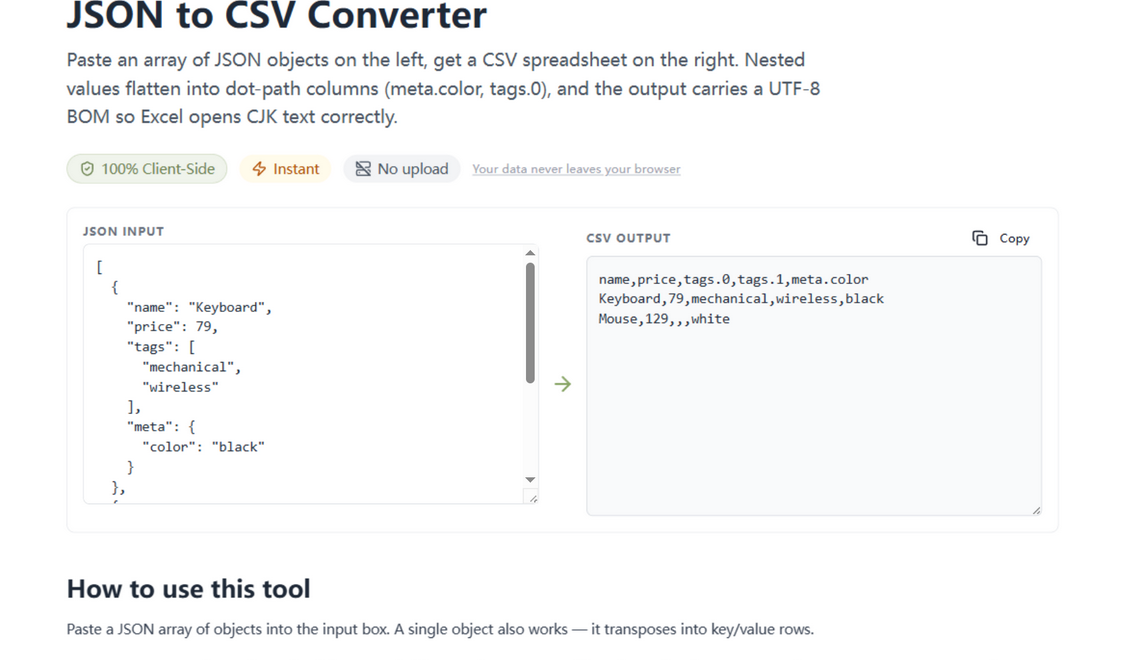
The converter now flattens nested objects and arrays into dot-path columns — meta.color, tags.0, tags.1 — so every value lands in its own cell, and prefixes the output with a UTF-8 BOM that Excel uses to detect the encoding. A bare object now transposes into key/value rows instead of one wide, unreadable row. Flat arrays of objects convert exactly as before; the page's how-to and FAQ were rewritten to match the new behavior.
Tree view: searchable, and one click from the path
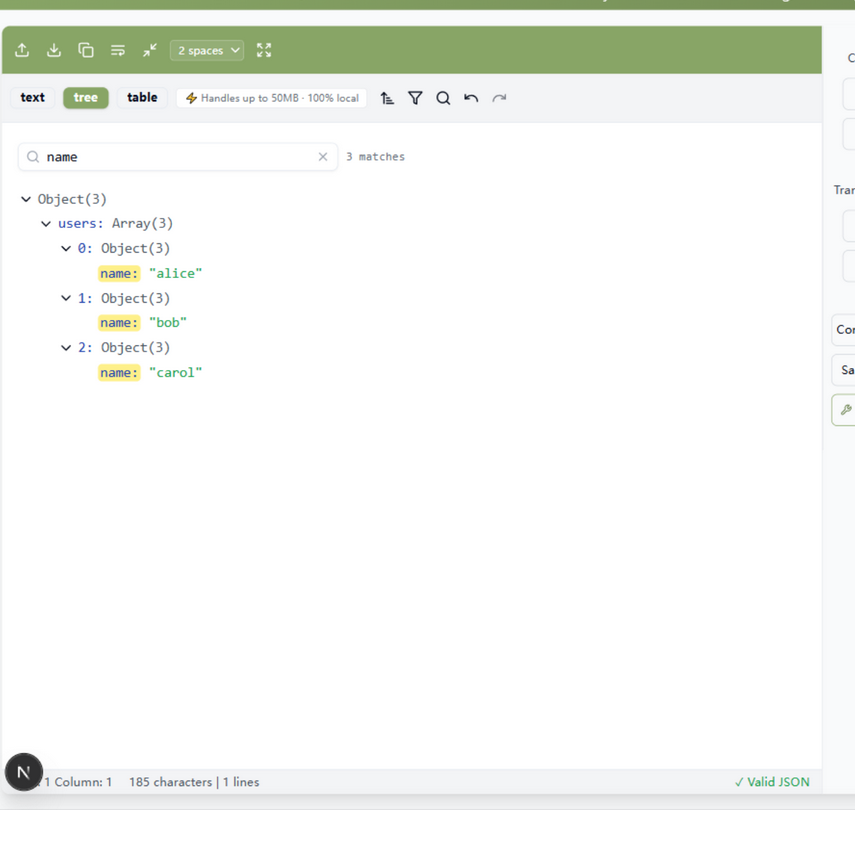
The tree/table views are how people explore unfamiliar JSON, and until now the only way to find anything was scrolling and eyeballing. The tree view gained a search box: type a fragment of a key or value, and the tree filters down to matching nodes with their ancestor branches auto-expanded, matches highlighted, and a live match count. Hovering any node now also offers one-click copy value and copy path (as a dot-path expression you can paste straight into JSONPath or jq), and the inline editor flags invalid JSON on the node instead of failing silently in the console.
How to use them
Compare: put the two documents in the left and right panes, click Compare in the middle toolbar, and read the changes — added, removed, modified — with unchanged entries hidden by default. Export: open the JSON to CSV tool, paste an array, copy the result into Excel — BOM included, nested columns expanded. Explore: open the editor in tree view (or switch the pane to tree yourself), search for a key or value fragment, and copy the path of anything you find straight into your jq filter or JSONPath query.
Correctness you can verify
Every fix in this round was driven by testing against real data until the behavior was provably right. An array diff should pair items by identity instead of reporting index cascades; CSV output should carry a BOM and real columns so it survives contact with Excel; a tree view should be searchable, not just scrollable. And every claim in this post was verified in a live browser against real documents — the carol/dave array case, a CJK payload pasted into Excel-shaped CSV, a tree searched for name.
As always, all of it runs client-side: the diff, the CSV flattener, and the tree never send a byte anywhere. And if you find a case where the smart pairing gets an array wrong, that's a bug we want — tell us.
Try it in your browser
Every tool on JSON Formatter App runs 100% client-side. No upload, no signup.
Open the editor